WYVRN Effects Library
WYVRN 效果库(The WYVRN Effects Library) 是一组预制的 Chroma 和触觉效果库,可轻松添加到任何游戏中。该效果库提供画廊(Gallery),简单复制粘贴即可使用。事件名称可配合 SetEventName 方法使用来触发事件效果。
交互式画廊
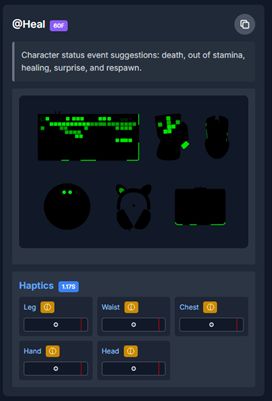
交互式画廊可通过以下链接在浏览器中查看: https://tools.wyvrn.com/WyvrnEffectsLibrary/。画廊会按事件展示可用效果,若资源可用,会提供 Chroma 与触觉预览。每个事件包含名称、持续时间、描述、Chroma 渲染器、触觉渲染器,以及用于生成示例代码的一键复制按钮。画廊资源将由 Synapse 自动分发到游戏;新添加到库中的事件将自动分发给终端用户。
教程
您可以按照这个 3 分钟的教程快速实现您游戏中的 Chroma 和触觉效果。
在本教程中,您将了解到:
- 安装并将 WYVRN SDK 连接到您的游戏引擎。
- 配置 Razer Synapse 以便正常运行高清触觉和 Chroma 效果。
- 浏览、预览和搜索 WYVRN 效果库以找到合适的效果。
- 将效果命令复制到您的游戏包体中,并控制在游戏过程中特效的播放方式。
最终,通过简单的几个步骤,您将确切地了解到如何将已有的触觉和灯光效果集成到您的游戏中。
Chroma 渲染器
Chroma 渲染器展示一组 Chroma 设备, 用于模拟该事件在 Razer 设备上的显示方式。Chroma 的持续时间以帧为单位。Chroma 在硬件上以每秒 30 帧进行播放。
Haptics 渲染器
如果事件有可用的资源,触觉渲染器可通过两种方式显示。

触觉渲染器:图表
图表视图以图表形式渲染,纵轴表示幅度(amplitude),横轴表示时间(time)。

触觉渲染器:圆形
触觉视图渲染为一个动画圆圈,其半径代表触觉的强度。红色竖线表示时间(左端为开始,右端为结束)。

代码生成
画廊可生成用于集成的代码,复制粘贴即可使用。使用语言下拉菜单设置代码生成语言。

代码生成:文本
“Text” 选项会复制事件名称的文本信息。当事件发生时事件名称将触发对应的 Chroma 与触觉效果。

代码生成:C++
“C++” 选项会生成 C++ 示例代码。
WyvrnAPI::CoreSetEventName(L"@Heal");
代码生成:Unreal
“Unreal” 选项会生成 Unreal C++ 示例代码。请参阅以下页面了解在 Unreal 中集成的指南:
[WYVRN SDK Unreal Engine Plugin Integration (External) - Indie Developers] (https://doc.wyvrn.com/docs/wyvrn-sdk/unreal-engine/)
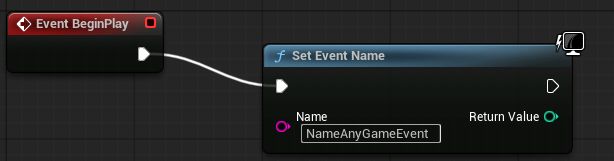
UWyvrnSDKPluginBPLibrary::SetEventName("@Heal");
Blueprints 使用 “Text” 选项。
代码生成:C#/Unity
“C#” 选项会生成 C# 示例代码。
WyvrnAPI.CoreSetEventName("@Heal");
过滤器:文本
事件可以通过文本搜索进行筛选,搜索将匹配事件名称。
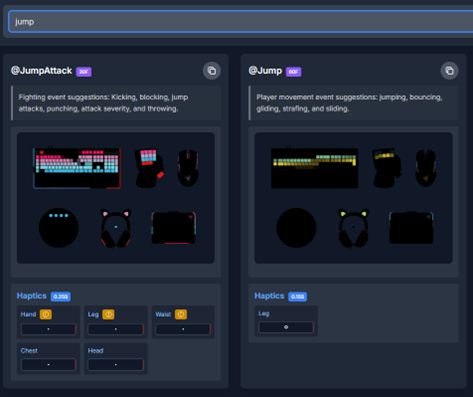
过滤器:文件夹
事件可以按文件夹类别进行筛选,方便查找。
