WYVRN Unreal SDK
The WYVRN SDK has a C++ / Blueprint library to integrate with AI, Chroma, and haptics.
This WYVRN SDK plugin has been tested with:
UE4:4.21and newerUE5:5.0and newer
A PS5 version of the plugin plays WYVRN haptic events on the DualSense wireless controller. See PS5 Plugin (DualSense).
About
The WYVRN SDK is a runtime game plugin that is shared to provide a common API for naming events and triggering external Chroma animations, haptic effects and AI events.
Security
To avoid a 3rd party injecting malicious code, the plugin checks for a valid signature on the Razer Chromatic Library. The DLL issuer is validated to be Razer USA Ltd. Init and InitSDK will return RZRESULT_DLL_INVALID_SIGNATURE if the signature check fails.
General
- The WYVRN SDK allows an application or game to set the details in the Chroma Apps list within the
Chroma App.
This document provides a guide to integrating AI, Chroma, and haptics using the WYVRN C++ SDK. Here is the list of available methods from the API:
-
Initialize SDK: Initialize the WYVRN SDK to use the library.
-
Set Event Name: Name a game event or game trigger to add Chroma and haptics.
-
Uninitialize SDK: Cleanaly uninitialize the WYVRN SDK when done.
WYVRN SDK
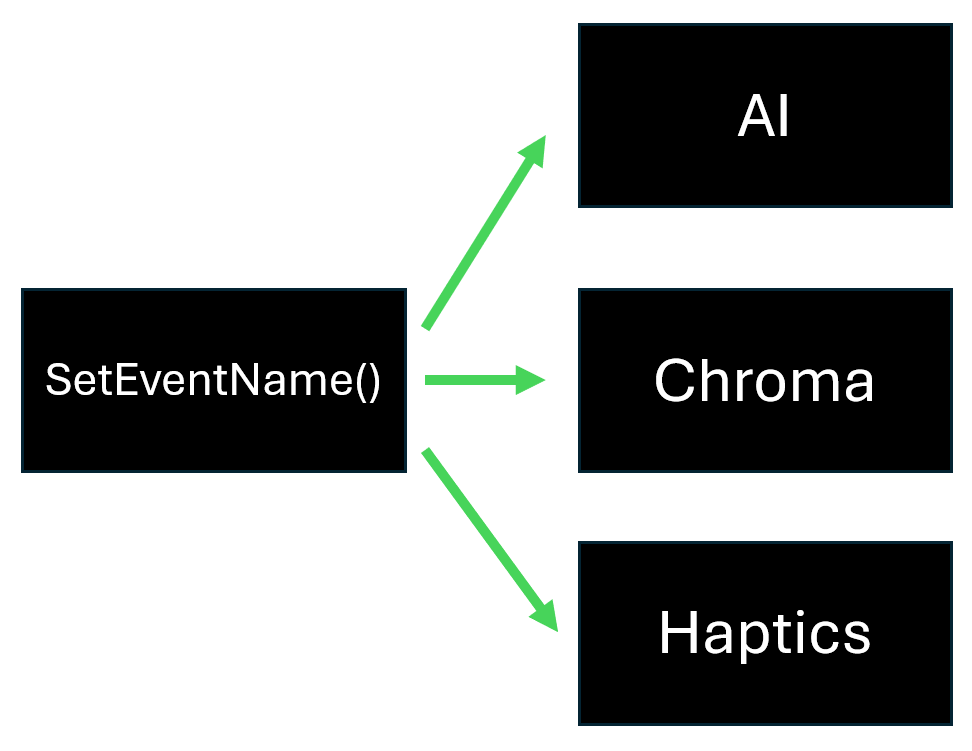
The WYVRN SDK is the combination of AI, Chroma, and Razer Sensa HD Haptics in a single SDK. By integrating AI, RGB lighting and haptics into game environments and events, players can enjoy a truly immersive gaming experience. The WYVRN SDK is capable of playing Chroma animations and haptics on the Razer Sensa HD Haptics devices. SetEventName() can trigger AI interaction, RGB lighting, or haptics or all of the above.
Downloads
SDKs
- WYVRN SDK
| Engine | Git Repo | Download Link | Git Repo | Download Link | Git Repo | Download Link | |
|---|---|---|---|---|---|---|---|
| Encoding | UNICODE | ASCII | MULTI-BYTE | ||||
| WYVRN Design Template | Git | Download | |||||
| WYVRN C++ SDK | Git | Download | Git | Download | Git | Download | |
| WYVRN Unreal SDK | Git | Download | |||||
| WYVRN Unity SDK | Git | Download |
Runtime Plugin Structure
Plugin Definition: Plugins/WyvrnSDKPlugin/WyvrnSDKPlugin.uplugin
Plugin Source: Wyvrn_Sample/Plugins/WyvrnSDKPlugin/Source/WyvrnSDKPlugin/
Headers: Wyvrn_Sample/Plugins/WyvrnSDKPlugin/Source/WyvrnSDKPlugin/Public/
Implementation: Wyvrn_Sample/Plugins/WyvrnSDKPlugin/Source/WyvrnSDKPlugin/Private/
Sample Blueprint Init / Uninit Setup
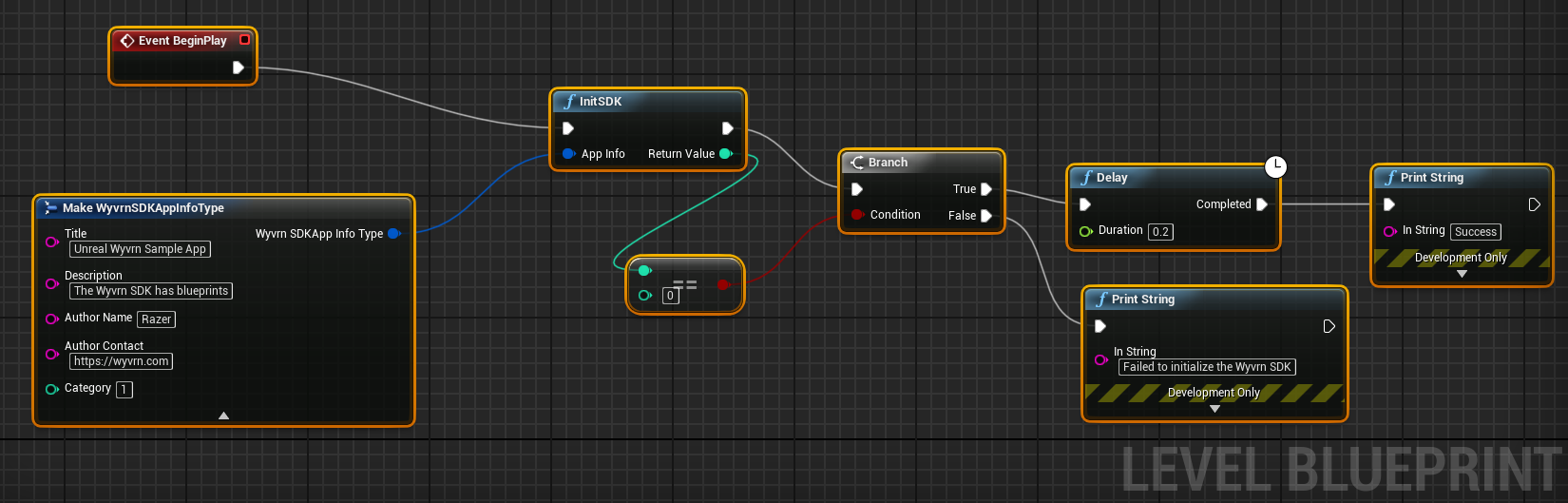
Event BeginPlay invokes InitSDK passing the AppInfo that provides the information that displays within Synapse->Connect->Apps. InitSDK returns 0 upon success after a 100ms delay the WYVRN API is ready to use. If InitSDK returns nonzero, avoid further calls to the WYVRN API.
InitSDK
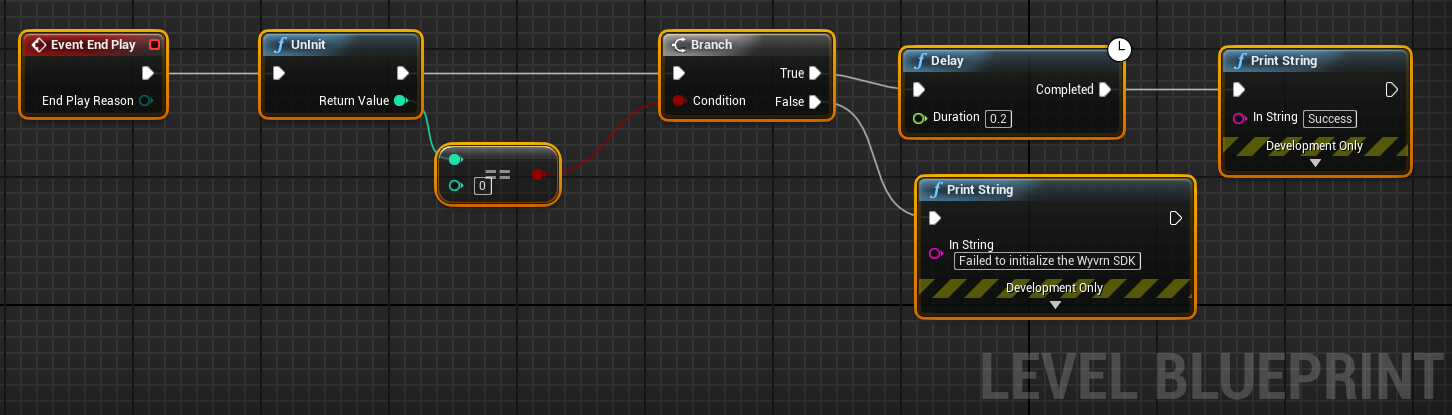
UnInit
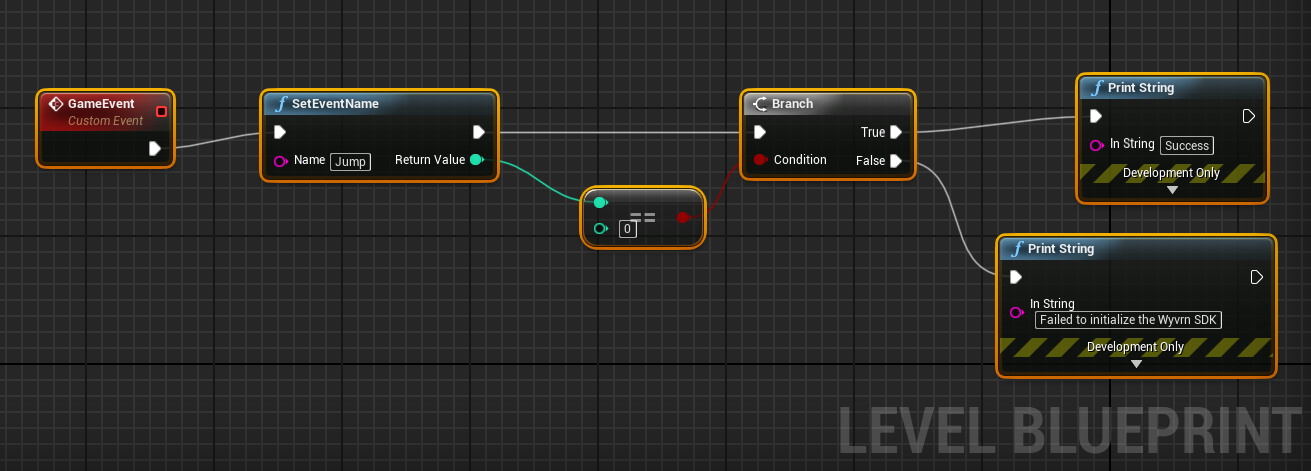
SetEventName
Namespace
The UWyvrnSDKPluginBPLibrary uses a global namespace to make the Blueprint library available.
#include "WyvrnSDKPluginBPLibrary.h"
API Class
The WyvrnAPI class provides a wrapper for the WYVRN SDK Library. The UWyvrnSDKPluginBPLibrary class exposes the WYVRN API to blueprints. The UWyvrnSDKPluginBPLibrary functions can also be called from C++.
Initialize SDK
Initialize the WYVRN SDK in order to utilize the API. The InitSDK method takes an AppInfo parameter which defines the application or game details that will appear in Synapse and the Chroma App within the Chroma Apps tab. The expected return result should be RZRESULT_SUCCESS which indicates the API is ready for use. If a non-success result is returned, the WYVRN implementation should be disabled until the next time the application or game is launched. Reasons for failure are likely to be the user does not have the Synapse or the Chroma App installed. After successfully initializing the WYVRN SDK, wait approximately 100 ms before setting events.
if (!UWyvrnSDKPluginBPLibrary::IsInitialized())
{
    FWyvrnSDKAppInfoType appInfo;
    appInfo.Title = "Unreal WYVRN Sample Game Application";
    appInfo.Description = "A sample application using Razer Wyvrn SDK";
    appInfo.Author_Name = "Razer";
    appInfo.Author_Contact = "https://WYVRN.com";

    //    0x01 | // Utility. (To specify this is an utility application)
    //    0x02   // Game. (To specify this is a game);
    appInfo.Category = 1;

    int32 result = UWyvrnSDKPluginBPLibrary::WyvrnSDKInitSDK(appInfo);
    if (result == RZRESULT_SUCCESS)
    {
        // Init Success! Ready to use the WYVRN SDK!
    }
    else
    {
        // Init Failed! Stop using the WYVRN SDK until the next game launch!";
    }
}
Set Event Name
Game events can be named to add supplemental technology to your lighting experience. By naming game events and game triggers, the event name can be used as a lookup to do things for AI, Chroma, and haptics. SetEventName("Jump") could be used to play a Chroma animation for the jump game event. The Jump event can also use A corresponding haptic effect to enhance emersion for the title. No other APIs are required to add Chroma and haptics other than to invoke SetEventName(). Some game events can have lighting or haptics or both. It just depends on the game design to create an experience that makes sense.
// Trigger AI, Chroma, and haptics
UWyvrnSDKPluginBPLibrary::SetEventName("Jump");
The API can use event names with a fallback parameter so that if the WYVRN configuration doesn't match on the event name, an alternative event name can be used. EVENT_A;fallback=EVENT_B will search the WYVRN configuration for EVENT_A and if not matched will fallback to the EVENT_B. EVENT_A will test for matches with external commands and fallback commands before attempting a fallback for EVENT_B. If neither event matches, nothing will happen. If both fallback methods are used meaning fallback=EVENT_B is provided with SetEventName and the configuration specifies the fallback event, the result will prioritize the configuration over the SetEventName fallback.
UWyvrnSDKPluginBPLibrary::SetEventName("EVENT_A;fallback=EVENT_B")
Generic Database
Games can provide a WYVRN configuration that SetEventName will use to find a match. If a match is not found, the system then looks at the GenericEvent WYVRN configuration to make a match. If neither the game or GenericEvent WYVRN configurations match, nothing will happen.
ExternalCommands use exact string matches where FallbackCommands use regular expression matching. The .* string is a wildcard that can be used to match partial event names. The ".*FALLBACK_ID" pattern will match any string that ends with "FALLBACK_ID". The "FALLBACK_ID.*" pattern will match any string that starts with "FALLBACK_ID". The ".*FALLBACK_ID.*" pattern will match on an event name that contains the "FALLBACK_ID" string.
{
  "FallbackCommands": [
    {
      "External_Command_ID": ".*FALLBACK_ID.*"
    }
  ]
}
Uninitialize SDK
Applications should uninitialize the WYVRN SDK with Uninit() for a clean exit. Uninitialization is only needed if the WYVRN SDK was successfully initialized. The expected successful return result should be RZRESULT_SUCCESS.
int32 result = UWyvrnSDKPluginBPLibrary::WyvrnSDKUnInit();
if (result == RZRESULT_SUCCESS)
{
    // WYVRN has been uninitialized!
}
else
{
    // WYVRN uninitialization was unsuccessful!
}
Getting Started
Frameworks supported
-
Windows WyvrnSDK (32-bit)
-
Windows WyvrnSDK (64-bit)
-
PS5 (haptics on the DualSense wireless controller, see PS5 Plugin (DualSense))
Assets
A game uses SetEventName to name game triggers. No other assets need to be included in the game to add haptics and lighting effects. Playback is controlled from the external Events.config for the named events. On PS5, the haptic effects are imported into the Unreal project and packaged with the game, see PS5 Plugin (DualSense).
PS5 Plugin (DualSense)
The PS5 version of the Unreal WYVRN plugin plays WYVRN haptic events on the DualSense wireless controller: vibration on the left and right sides, and adaptive-trigger resistance. Gameplay code uses the same SetEventName calls as on PC. The difference is that on PS5, the haptic effects are imported into the Unreal project and packaged with the game.
Source: Unreal_WyvrnSDK, feature/TR_ps5HapticsPort branch
Before you start: get the PS5 libraries
The PS5 plugin depends on two binary libraries that aren't included in the Unreal_WyvrnSDK repository:
- the Interhaptics HAR engine (
HAR.prx) - the DualSense provider (
Provider_DualSensePS5.prx)
Their link stubs are also required.
They come from the private InterhapticsEngine_PS5 repository, which is available to registered PlayStation Partners.
The Interhaptics Engine libraries for the PS5® console can be requested through the Tools and Middleware Directory on DevNet. Look for the haptic design tool in the Peripheral category from WYVRN (A Razer Company). You must be a registered PlayStation™ Partner before you can get access. See the PS5 integration guide for details.
Once you have them, place the libraries in Source/ThirdParty/Interhaptics/PS5/bin inside the plugin. The build detects them and packages them with the game automatically.
Without them, the PS5 build still compiles and runs, but haptics and adaptive triggers stay switched off. If the controller stays silent, check the log for a "haptics inert" warning.
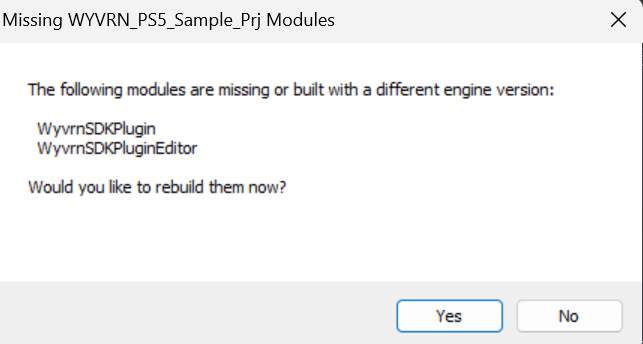
When the project is opened for the first time, Unreal may report that the WyvrnSDKPlugin and WyvrnSDKPluginEditor modules are missing or built with a different engine version. Select Yes to rebuild them.
Integrate in 3 steps
-
Design: Create and tune the effects in the usual WYVRN workflow, the same as for the PC version.
-
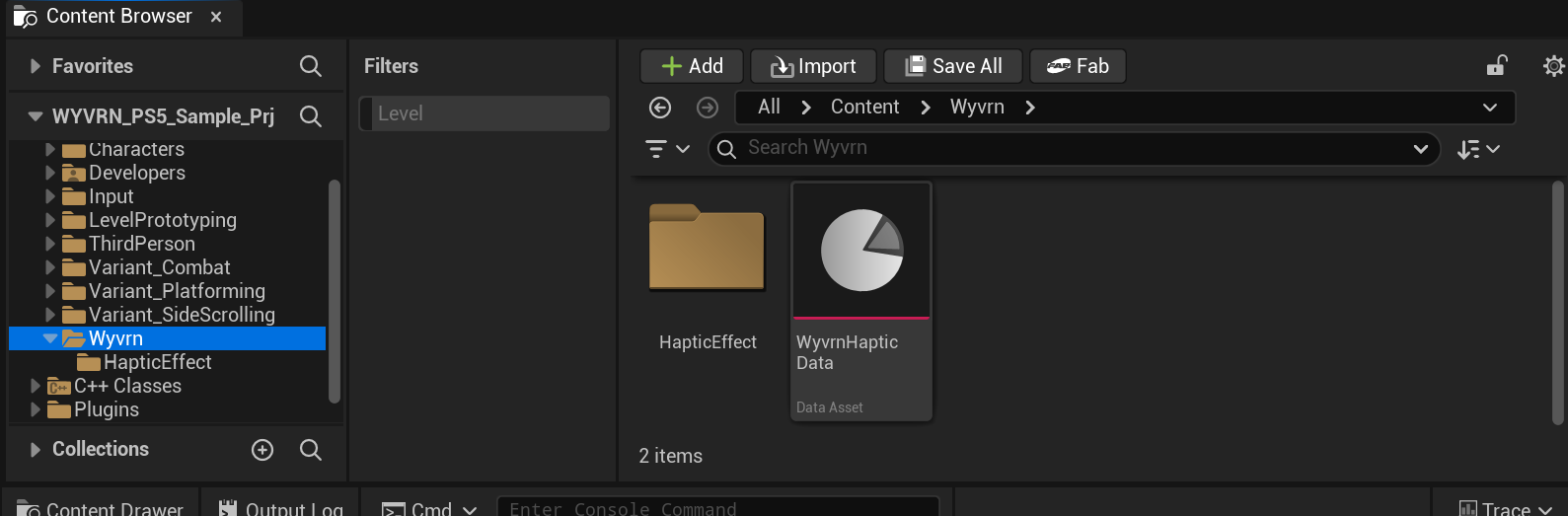
Import: In the Unreal Editor, go to Tools → Import WYVRN Haptics… and select the WYVRN folder. For automated builds, use the
Wyvrn.ImportHapticsconsole command instead. The importer readsWYVRN.config, converts each effect it references into an Unreal asset, and saves the event table to/Game/Wyvrn. It also detects which effects include a trigger-resistance (Stiffness) track.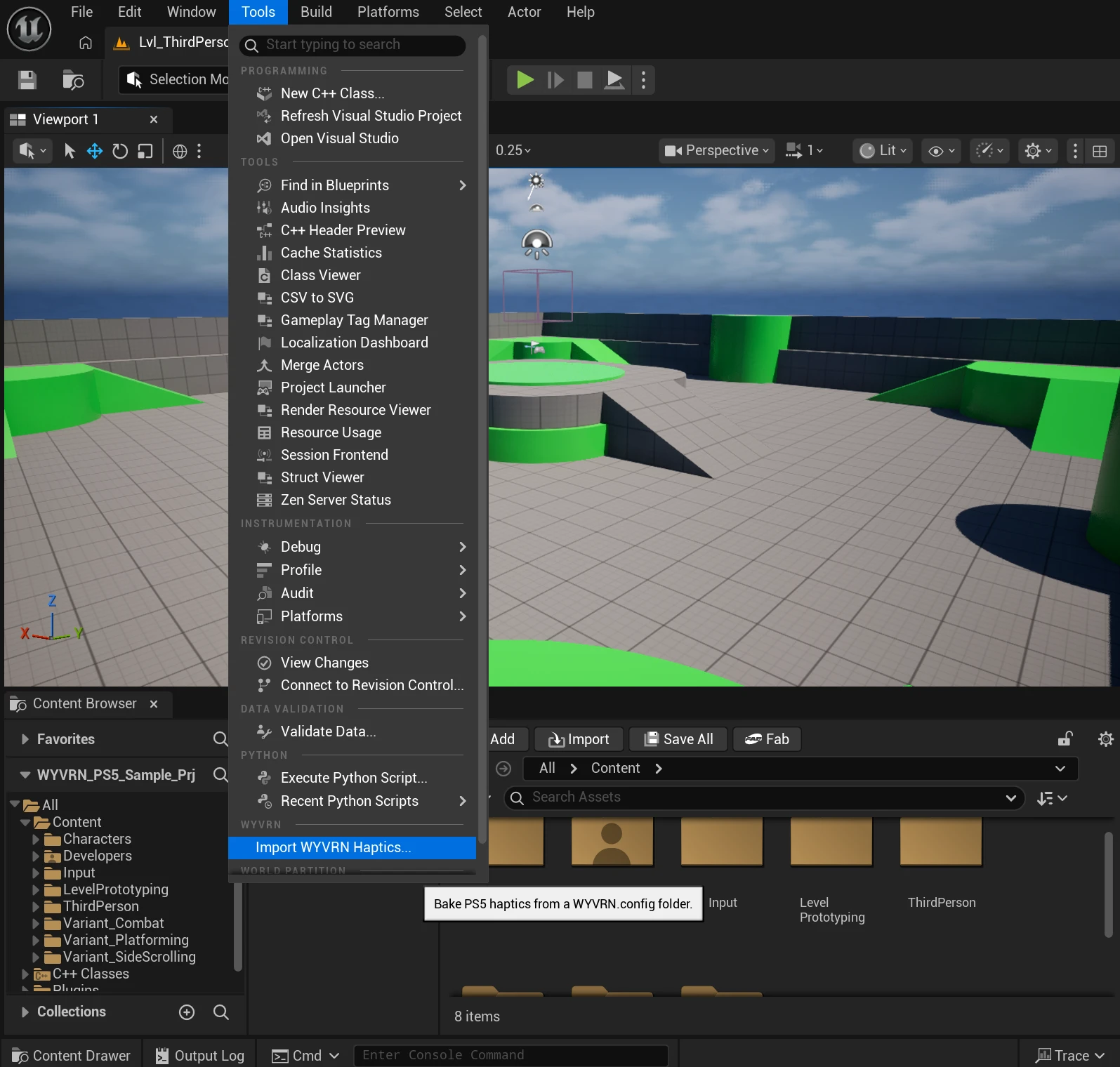
-
Build: The importer adds its output folder to the project's always-cook list, so the effects are packaged into the PS5 build automatically. You don't need to change any packaging settings.
Updating effects
If an effect or its settings change after import, run the importer again. It asks for confirmation, overwrites the previous assets in place, and the next build picks up the change.
Unlike on PC, where effects are delivered outside the game, a changed effect on PS5 reaches players only in a new game build.
Full API
WYVRN SDK Library Methods:
PluginCoreInitSDK
Direct access to low level API.
// DLL Interface
EXPORT_API RZRESULT PluginCoreInitSDK(
    ChromaSDK::APPINFOTYPE* AppInfo);

// Class Plugin
int32 Result = UWyvrnSDKPluginBPLibrary::WyvrnSDKInitSDK(AppInfo);
PluginCoreSetEventName
Direct access to low level API.
// DLL Interface
EXPORT_API RZRESULT PluginCoreSetEventName(LPCTSTR Name);

// Class Plugin
int32 Result = UWyvrnSDKPluginBPLibrary::SetEventName("Effect1");
PluginCoreUnInit
Direct access to low level API.
// DLL Interface
EXPORT_API RZRESULT PluginCoreUnInit();

// Class Plugin
int32 Result = UWyvrnSDKPluginBPLibrary::WyvrnSDKUnInit();