Interhaptics XR SDK (Meta Quest)
caution
The Interhaptics Unity SDK is no longer actively maintained: it is offered as is, with major bug fixes only (if any) and limited support on Discord. Its capabilities are moving to the WYVRN Unity SDK. See the Interhaptics SDK overview.
Step 1: Setting up the Interhaptics Core SDK
The Interhaptics Core SDK can be installed via the Unity Package Manager as described in the documentation.
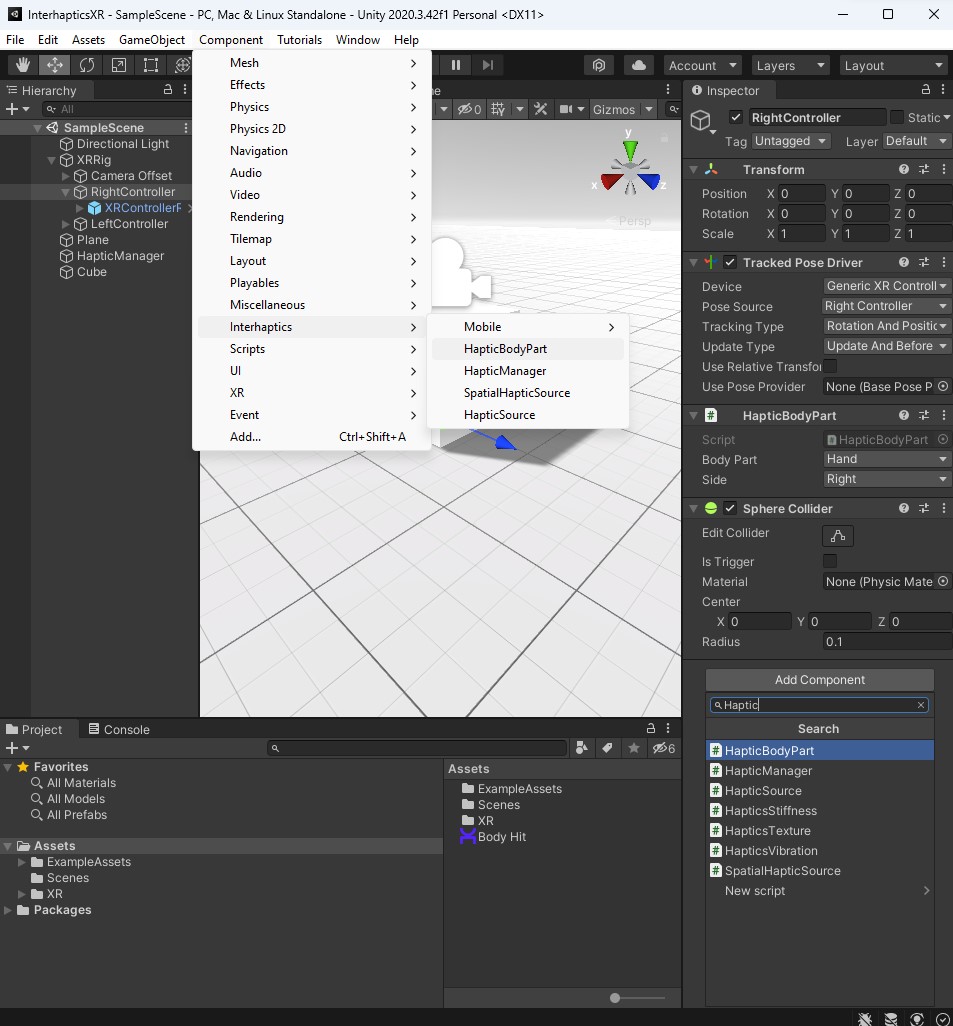
Step 2: Adding GameObjects for Custom Haptics
- Create an empty GameObject for the HapticManager, which can be set to be persistent if desired.
- Add HapticBodyPart components to the XR Rig, one for each controller. Set the Body Part to Hand and the correct orientation.
- Create a normal GameObject, such as a cube, to act as a trigger for haptic feedback.
- Add a SpatialHapticSource component to the trigger GameObject, where offsets for Haptic Effect can be set (e.g. a 2-second delay for vibrations).
Step 3: Adding Haptic Effects
- The Interhaptics SDK package includes over 30 haptic effects with accompanying audio, which can be selected for use.
- Custom haptic effects can also be imported and used, created with the Haptic Composer.
Step 4: Testing
- Press play in Unity and touch the collider to trigger haptic feedback.
Refer to the provided video tutorial for further guidance.