THX Spatial Audio+
目次
はじめに
THX Spatial Audio+ は、Audiokinetic Wwise 向けの空間オーディオ処理プラグインです。
仕様:
- プラットフォーム: Windows x64
- Wwise バージョン: 2024.1 および 2025.1
- チャンネル構成: 7.1.4 入力(12 チャンネル)から ステレオ出力(2 チャンネル)へ
インストール
-
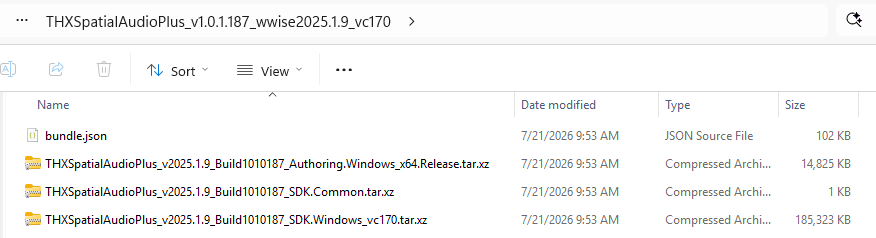
このリンクからプラグインをダウンロードします。
-
Audiokinetic のドキュメントに従ってプラグインをインストールします。
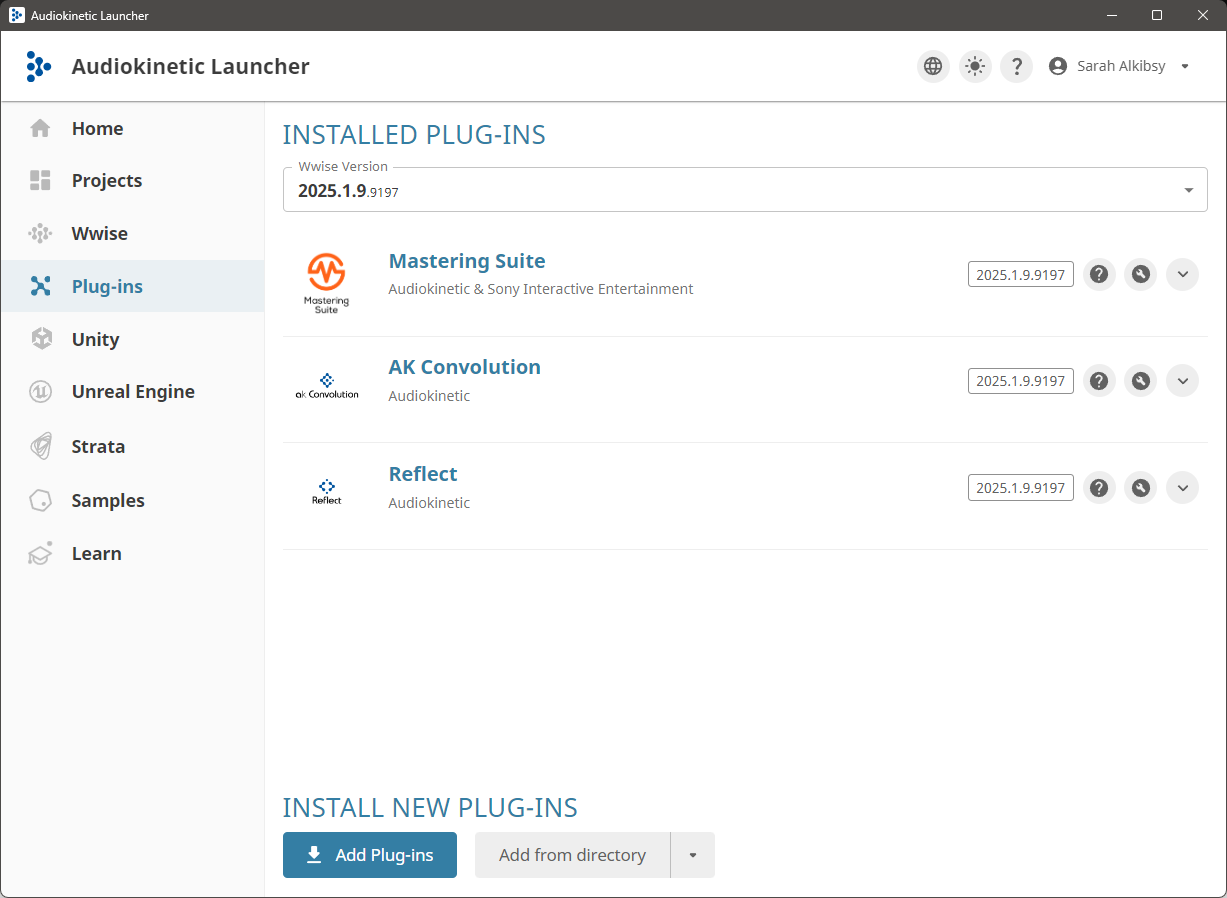
- Audiokinetic Launcher を起動します。
- Plug-ins タブを開きます。
- Wwise のバージョンを選択し、Add from directory をクリックします。
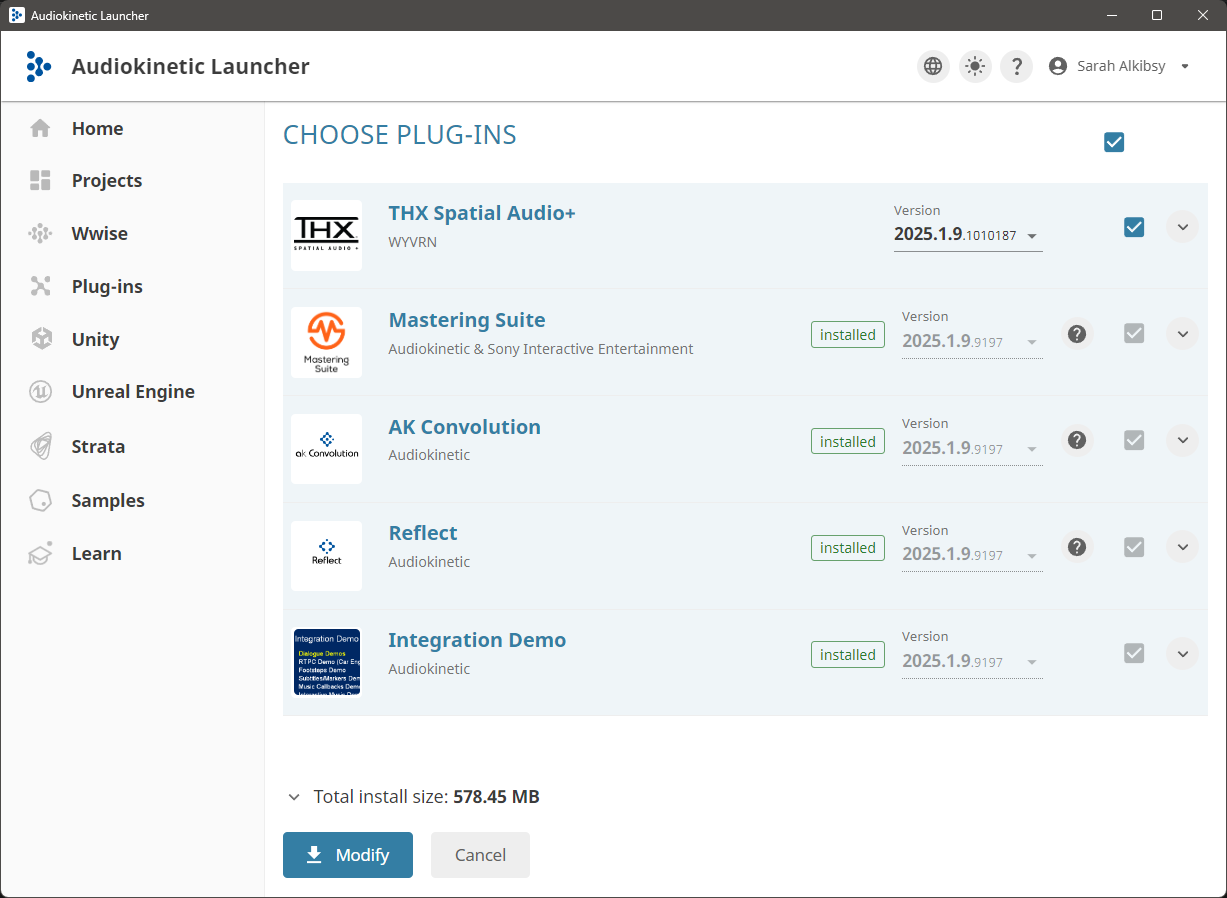
-
展開したファイルが入ったフォルダーを選択し、Modify を押します。
- プラグインが選択した Wwise のバージョンにインストールされます。
-
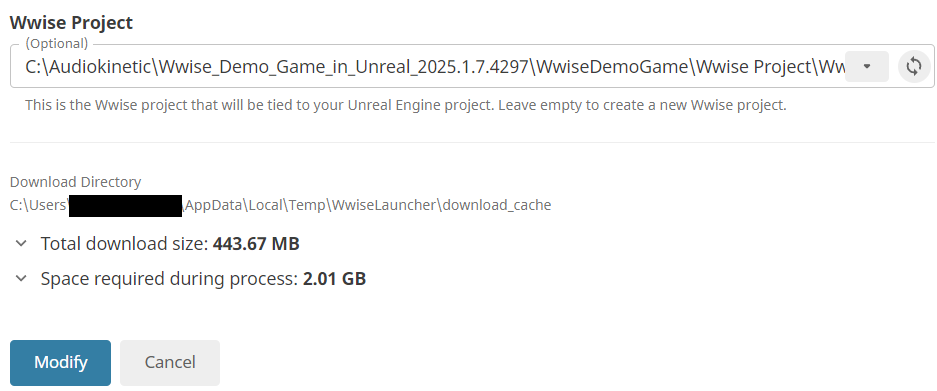
エンジン統合にプラグインをインストールするための追加手順に従います。Unreal/Unity の Audiokinetic ドキュメントはこちらで確認できます。
- ランチャーの Unreal Engine タブに移動します。
- 統合を使用しているプロジェクトを選択し、Modify Wwise in Project をクリックします。

- 次のページで Modify をクリックします。
注: UE5 Wwise 統合はデフォルトで動的ライブラリを使用します。これが推奨される使用方法です。
使い方
オーサリング
-
新しい Wwise プロジェクトを作成します。
-
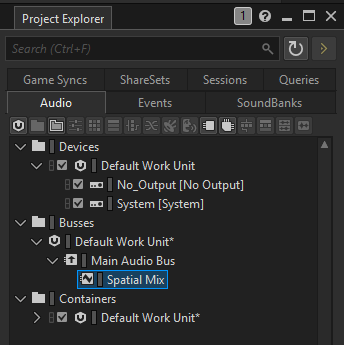
Master Audio Bus に子の Audio Bus を追加します。
-
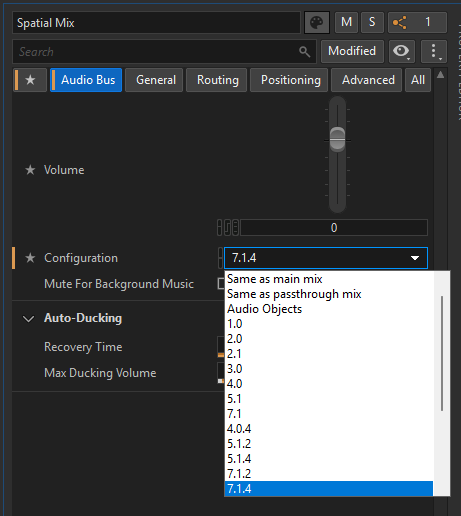
この新しいバスに 7.1.4 チャンネル構成を選択します。
-
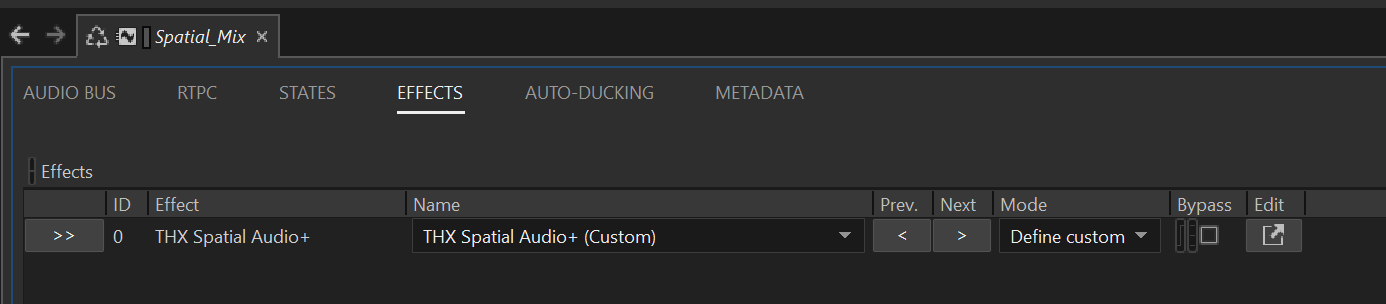
この Audio Bus に THX Spatial Audio+ プラグインを追加します。
-
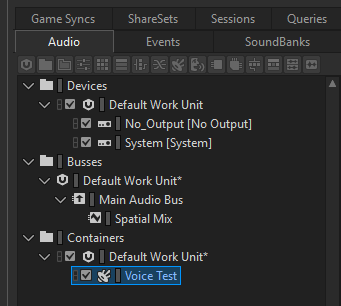
Containers(Actor-Mixer)階層にテスト用の SFX を作成します。
-
それを THX Spatial Audio+ プラグインを設定した Audio Bus にルーティングします。
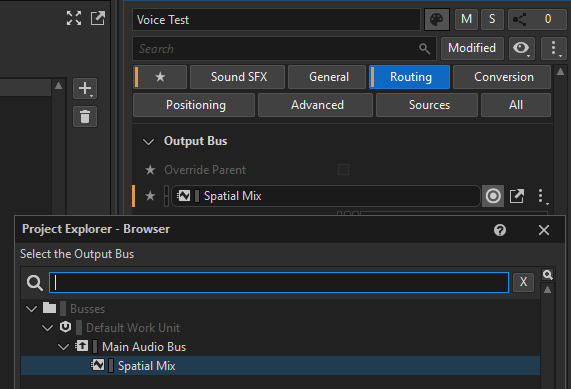
-
この SFX に対して 3D ポジショニング を有効にします。
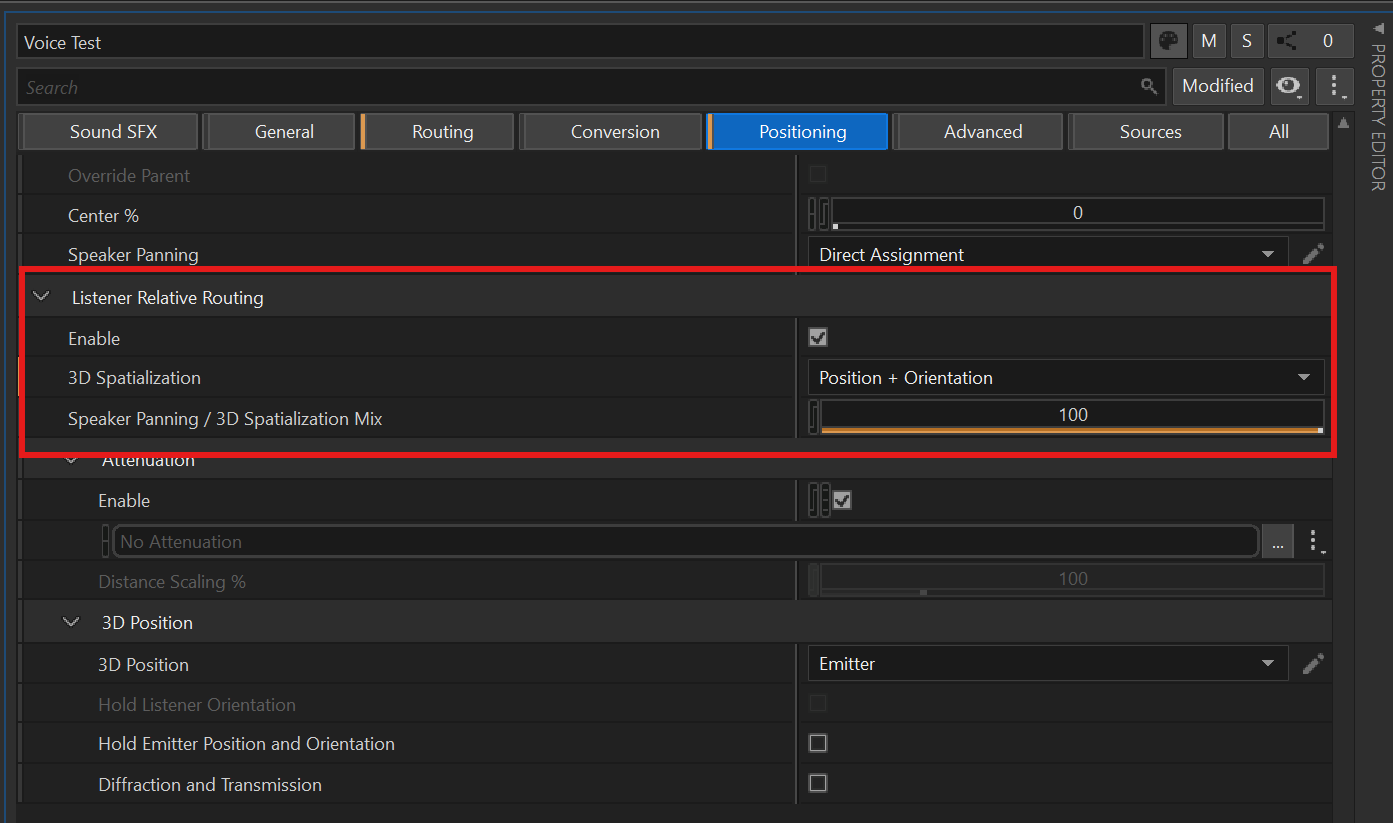
-
SFX を再生すると、THX Spatial Audio+ の処理が適用されます。
パラメータ
THX Spatial Audio+ は、両耳聴効果を制御するための一連のパラメータを提供します。
Room Direct
信号のダイレクトパスを制御します。これは、反射やリバーブを伴わずにリスナーに到達するオーディオを表します。

- Room Direct Enabled: 信号のダイレクトパスを有効または無効にします。
- Direct Gain: ダイレクト信号のゲインレベルをデシベル単位で制御します。
- EQ: ダイレクト信号パスに適用される 10 バンドイコライザーです。
- Direct EQ Enabled: 10 バンドイコライザーを有効または無効にします。
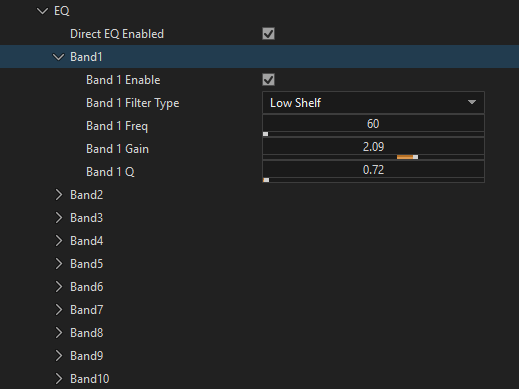
- Band Enabled: EQ バンドを有効または無効にします。
- Band Filter type: 各 EQ バンドのフィルタータイプを選択します(Peak、Low Shelf、High Shelf、High Pass、Low Pass、Notch、Band Pass、All Pass)。
- Band Frequency: EQ バンドの中心周波数を Hz 単位で設定します。
- Band Gain: EQ バンドのゲインをデシベル単位で制御します。
- Band Q: EQ バンドの Q ファクター(帯域幅)を制御します。
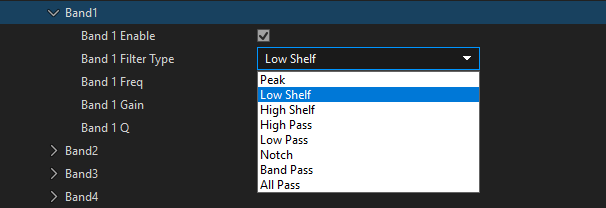
- Direct EQ Enabled: 10 バンドイコライザーを有効または無効にします。
Late Reverb
部屋の音響特性をシミュレートするために、レイトリバーブを生成します。
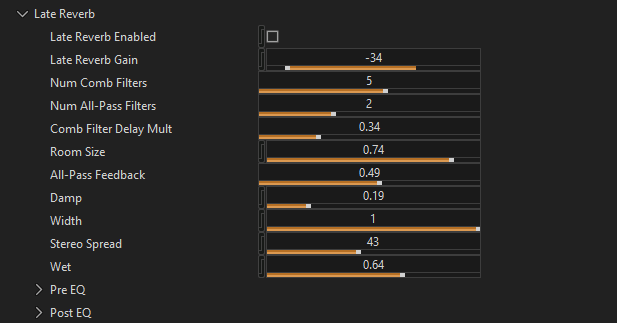
- Late Reverb Enabled: レイトリバーブ処理を有効または無効にします。
- Late Reverb Gain: レイトリバーブのゲインレベルをデシベル単位で制御します。
- Num Comb Filters: リバーブの生成に使用するコムフィルターの数を設定します。
- Num All-Pass Filters: オールパスフィルターの数を設定します。
- Comb Filter Delay Mult: コムフィルターのディレイタイムを乗算し、知覚される部屋のサイズに影響を与えます。
- Room Size: リバーブ空間の知覚されるサイズを制御します。
- All-Pass Feedback: オールパスフィルターのフィードバック量を制御します。
- Damp: 高周波のダンピングを制御し、明るさを抑えます。
- Width: リバーブ出力のステレオ幅を制御します。
- Stereo Spread: ステレオの分離感と空間的な広がりを生み出します。
- Wet: 出力ミックス内のウェット(リバーブのかかった)信号のレベルを制御します。
- Pre EQ: 処理の前に適用される 10 バンドイコライザーです。
- Post EQ: 処理の後に適用される 10 バンドイコライザーです。
Early Reflections
アーリーリフレクションを計算・処理し、リバーブテールの前に到達する最初の数回の音の反射をシミュレートします。
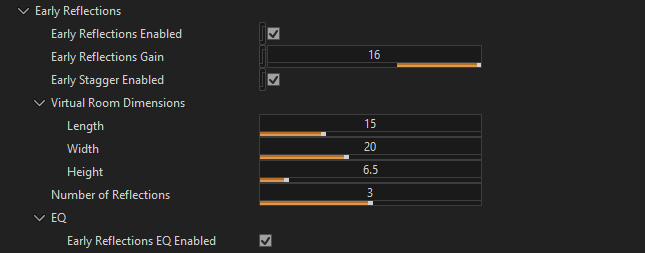
- Early Reflections Enabled: アーリーリフレクション処理を有効または無効にします。
- Early Reflections Gain: アーリーリフレクションのゲインレベルをデシベル単位で制御します。
- Early Stagger Enabled: 各反射にランダムなディレイオフセットを追加し、自然なパターンを生成します。
- Virtual Room Dimensions: タイミング計算のための仮想的な部屋の寸法(Length、Width、Height)を定義します。
- Number of Reflections: エミッターごとに処理する反射の最大数を設定します。
- EQ: アーリーリフレクションパスに適用される 10 バンドイコライザーです。
Emitters
リスナーに対する相対的な仮想エミッター(ラウドスピーカー)の位置を球面座標で定義します。これらは 7.1.4 チャンネルを表します: L+R(左/右)、C(センター)、LFE(サブウーファー)、LRS+RRS(リアサラウンド)、LS+RS(サラウンド)、LTF+RTF(トップフロント)、LTR+RTR(トップリア)。
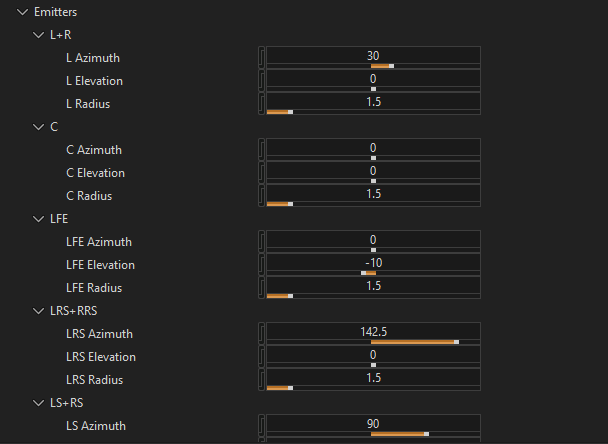
- Azimuth: リスナーに対するエミッターの水平角度(正面中央からの角度)。
- Elevation: リスナーに対するエミッターの垂直角度(水平面からの角度)。
- Radius: リスナーからエミッター位置までの距離(メートル単位)。
プリセット
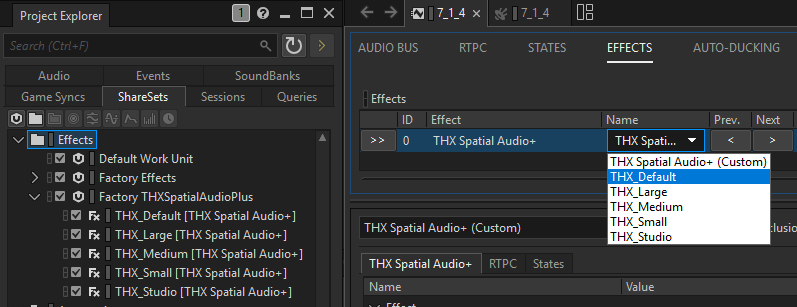
プリセットをインポートするには、Project -> 「Import Factory Assets...」を使用し、「THXSpatialAudioPlus」を選択します。以下のプリセットが(ShareSet として)提供されています。
- THX_Default
- THX_Large
- THX_Medium
- THX_Small
- THX_Studio
Passthrough
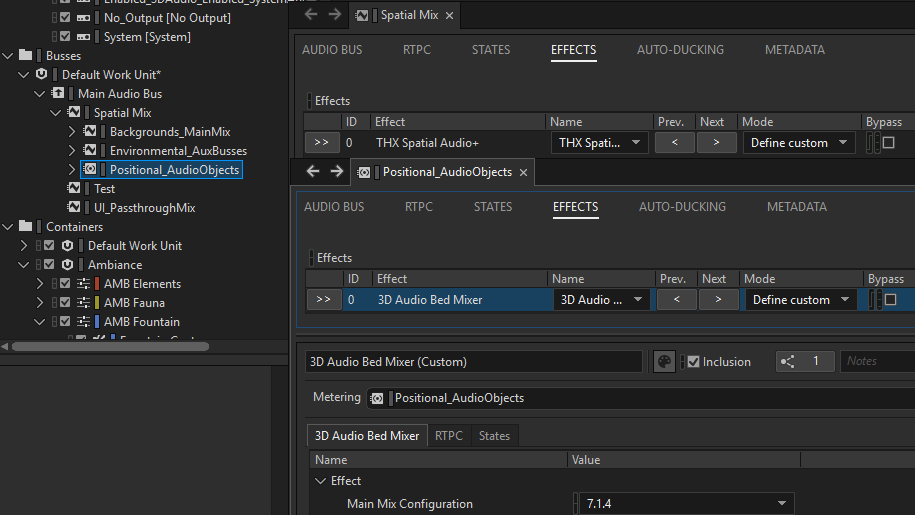
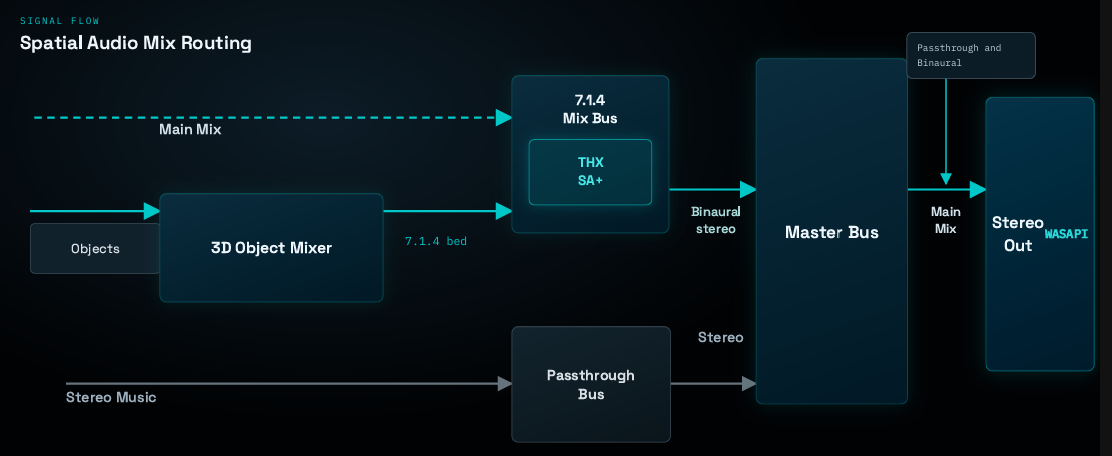
THX Spatial Audio+ の両耳化処理は処理の最終段に配置する必要があるため、パススルー互換性のために以下のワークフローを推奨します。
- オーサリングで説明したとおりに Spatial Mix バッファをセットアップします。
- すべてのオブジェクトを 7.1.4 チャンネルにミックスする Audio Objects バスに Wwise 3D Audio Mixer エフェクトを挿入します。
- プラグインは 7.1.4 ミックスをステレオにレンダリングします。得られた 2 チャンネル出力は Passthrough バスとミックスされ、出力デバイス(WASAPI)に送られます。
UE5
パッケージング
Unreal Engine プロジェクトをパッケージングすると、THXSpatialAudioPlus.dll はパッケージング出力(例: Plugins\WwiseSoundEngine\ThirdParty\x64_vc170\Debug\bin)に自動的にコピーされます。
ただし、data.bin(プラグインとともに Authoring/SDK フォルダーにインストールされるファイル)も同様にコピーする必要があります。これを確実に行うには 2 つの方法があります。
- 手動: パッケージ化したビルド内で
THXSpatialAudioPlus.dllと同じフォルダーにdata.binを配置します。 - 自動: パッケージング前に Wwise 統合のコードを変更します。
Plugins/WwiseSoundEngine/Source/WwiseSoundEngine/WwiseSoundEngineVersionBase.Build.csを開きます。Apply(...)内のランタイム依存関係ブロックを、以下のスニペットに置き換えます。
	SE.PublicDelayLoadDLLs.AddRange(WwiseUEPlatformInstance.GetPublicDelayLoadDLLs());
	foreach (var RuntimeDependency in WwiseUEPlatformInstance.GetRuntimeDependencies())
	{
	    SE.RuntimeDependencies.Add(RuntimeDependency);
}
- data.bin が自動的にステージングされるように、以下のスニペットに置き換えます。
SE.PublicDelayLoadDLLs.AddRange(WwiseUEPlatformInstance.GetPublicDelayLoadDLLs());
string runtimeBinDir = null;

foreach (var RuntimeDependency in WwiseUEPlatformInstance.GetRuntimeDependencies())
{
    SE.RuntimeDependencies.Add(RuntimeDependency);
    if (runtimeBinDir == null)
    {
        runtimeBinDir = Path.GetDirectoryName(RuntimeDependency);
    }
}

if (!string.IsNullOrEmpty(runtimeBinDir))
{
    var dataBinPath = Path.Combine(runtimeBinDir, "data.bin");
    if (File.Exists(dataBinPath))
    {
        SE.RuntimeDependencies.Add(dataBinPath, StagedFileType.NonUFS);
    }
}
- プロジェクト/エンジンを再ビルドして、Wwise UE 統合を更新します。
- 最終的にパッケージ化されたフォルダー(例: YourProject\Plugins\WwiseSoundEngine\ThirdParty\x64_vc170\Debug\bin)で、data.bin が THXSpatialAudioPlus.dll の隣に配置されていることを確認します。まだ存在しない場合は、パッケージングを開始する前にそのファイルが ThirdParty/.../bin/ 配下に既に存在していたかを再確認してください。